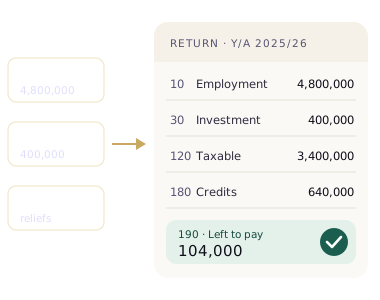
Gather your T-10 and every certificate showing tax already taken. Enter each income in TaxWise at its gross amount, with the tax withheld beside it in the same entry. Confirm your reliefs, clear the Before you file checks, then copy each figure cage by cage into the IRD e-Filing portal by 30 November 2026 and record the acknowledgement. TaxWise works the return out exactly from what you give it, so the accuracy of the return comes down to the accuracy of your entries. It prepares the return; you submit it.
TaxWise turns your income, the tax already taken from it and your reliefs into a finished Y/A 2025/2026 return: every slab worked out, every cage filled, and a balance to pay or a refund to claim. You then submit that return yourself on the IRD e-Filing portal. TaxWise is a preparation tool. It never submits for you.
This guide follows the app screen by screen. It's written for people whose employer deducts APIT and who also had some other income during the year: bank interest, dividends, rent or freelance work.
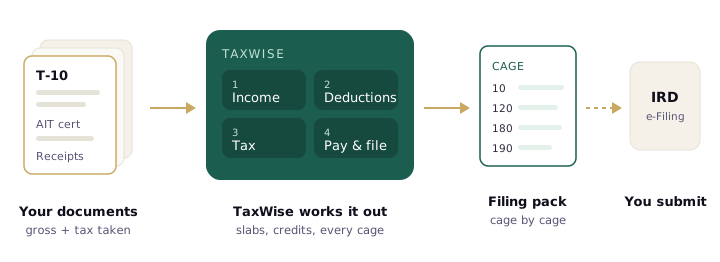
TaxWise does the arithmetic. The dashed arrow is the step you take yourself on the IRD portal.
What goes in decides what comes out
TaxWise applies the Y/A 2025/2026 rules to whatever you enter: the LKR 1,800,000 personal relief, the 6%, 18%, 24%, 30% and 36% slabs, and a credit for every rupee of tax already withheld. The same inputs always produce the same return. That makes the calculation reliable, and it also means the app can only be as complete as your records.
The rule of this guide: enter every income at its gross amount, and enter the tax already taken from it in the same entry. Do that for every source, and the return TaxWise produces is the correct one.
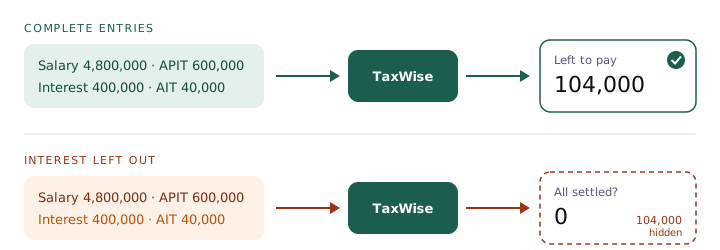
Same calculation, different inputs. The engine did nothing wrong in the second lane; it was never told about the interest.
Before you start: gather these
Ten minutes with your documents saves an hour of guessing later. You need the gross figure and the tax already taken for each income.
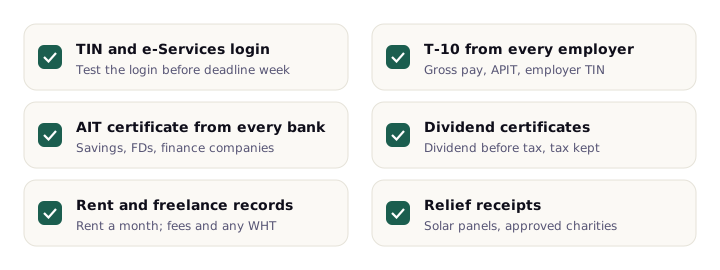
- TIN and IRD e-Services login. Test the login before deadline week.
- T-10 from every employer. It shows your gross pay, the APIT deducted and the employer's TIN.
- AIT certificate from every bank that paid you interest: savings accounts, fixed deposits, finance companies.
- Dividend certificates, showing the dividend before tax and the tax the company kept.
- Rent and freelance records: rent a month, fees received and any WHT the payer deducted.
- Relief receipts for solar panels or donations to approved charities.
All of it must fall inside the year of assessment: 1 April 2025 to 31 March 2026. TaxWise rejects dates outside that window, which catches the common slip of entering last year's certificate.
Step 1: Open your tax year
Sign up and answer two short questions. The first asks what came in during the year; tick every kind that applies, with no amounts yet. The second, "What do you do?", only appears if you picked business or fee income, and helps TaxWise suggest your IRD activity code. Press Open my tax year.
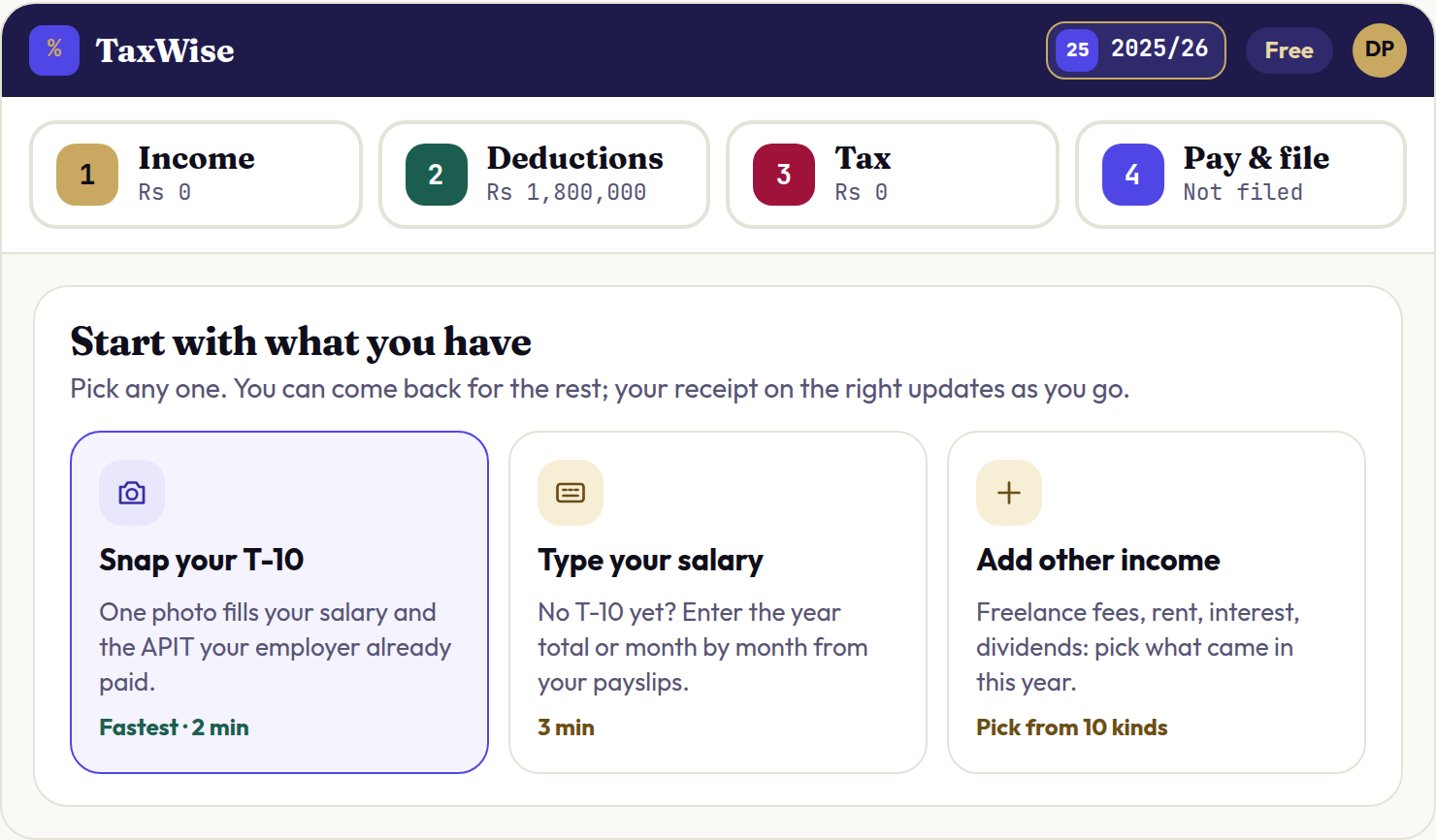
You land on the year home for 2025/2026. Across the top is a rail with the four moves you'll work through: Income, Deductions, Tax and Pay & file. Under "Start with what you have" you'll see three ways in: Snap your T-10, Type your salary and Add other income.
Step 2: Enter your salary from the T-10
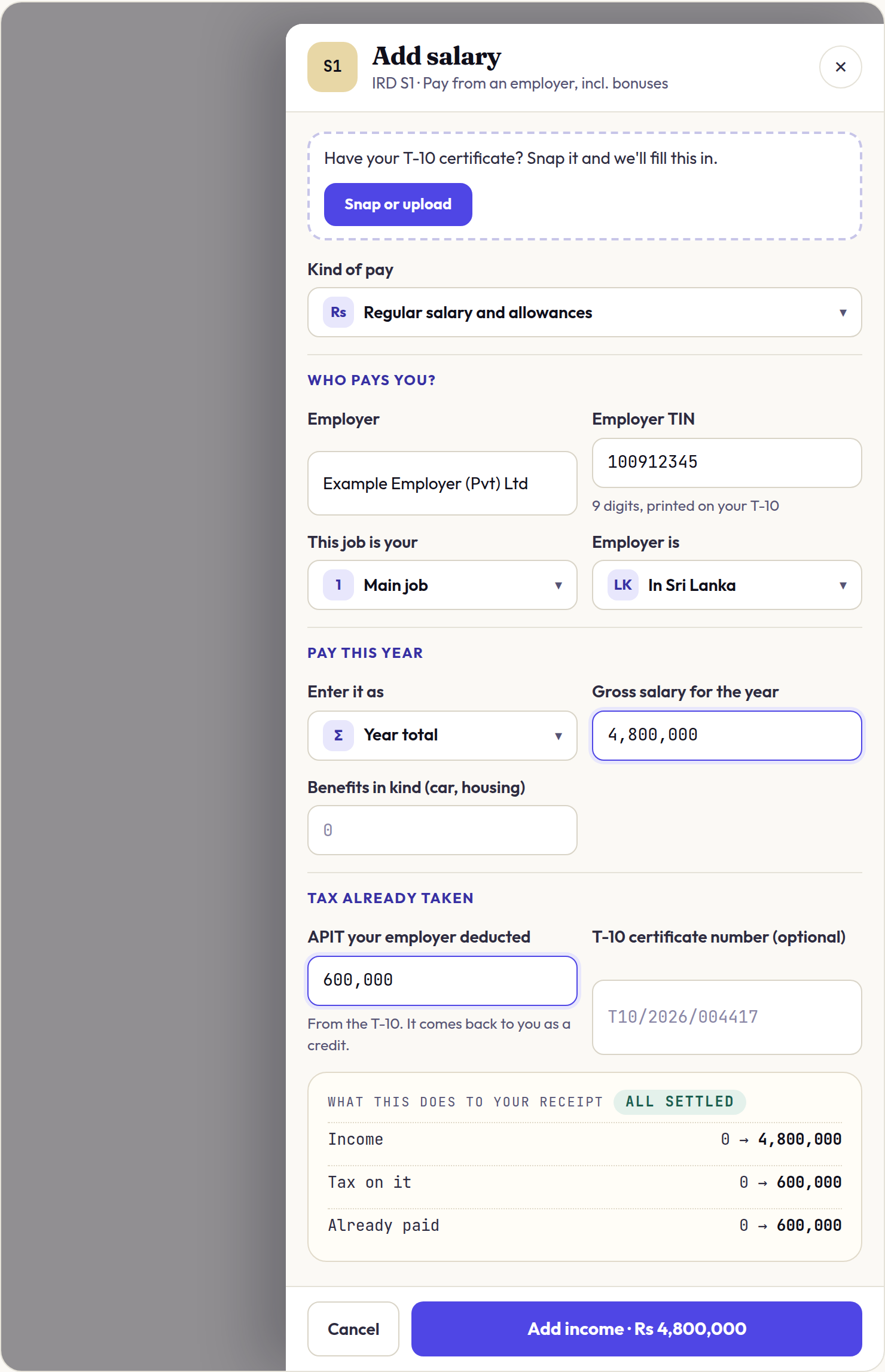
Your employer's T-10 certificate has the two numbers that matter most: your gross pay for the year and the APIT deducted from it. Open the Salary drawer from the Income move, or snap the T-10 and let TaxWise fill it in, then check each field.
- Who pays you? Employer name, the 9-digit employer TIN printed on the T-10, and whether this is your main job or a second job.
- Pay this year. Choose "Year total" if your T-10 gives one figure. Enter Gross salary for the year, before APIT, plus any benefits in kind such as a company car or housing.
- Tax already taken. Enter APIT your employer deducted. It comes back to you as a credit against your tax.
Two jobs during the year? Add the second as Another employer and mark it "Second job". Each employer gives its own T-10, and each APIT figure counts as a credit. You still get only one personal relief, which TaxWise applies once.
Step 3: Add every other income, gross
This is the step that decides whether your return is right. Use Add income for each source, and follow the same pattern every time: the amount before any tax, then the tax that was kept.
| Income | Enter as the amount | Enter as tax taken |
|---|---|---|
| Bank interest | Interest earned (before AIT) | AIT your bank kept, usually 10% |
| Dividends | Dividend before tax | Tax the company kept |
| Rent | Rent a month × months let | Any WHT the tenant deducted |
| Freelance fees | Each payment, in the payments list | WHT, with the payer's TIN |
There is no separate "credits" screen in TaxWise. The APIT, AIT (advance income tax, the withholding tax on interest) and WHT you enter on each income are added up for you on the Tax move. If a certificate shows tax taken, it belongs in the same entry as the income it came from.
Any income added from a bank statement or document starts as a draft. Drafts don't count until you confirm them, so check each one and press Confirm.
Which plan do you need? Salary and bank interest work on the free plan. Dividends and rent need Standard. Freelance, business and foreign income need Pro. You can see each plan's limits before you enter anything.
Step 4: Confirm your reliefs
Open the Deductions move. Most of it is already done for you.
- Personal relief of LKR 1,800,000 is already applied. You don't enter it.
- Rent upkeep allowance is automatic if you entered rent. TaxWise takes 25% of the rent off before tax.
- Did you install solar panels? Answer yes and enter the cost if you did.
- Did you donate to an approved charity? Answer yes and enter the amount if you did.
Medical bills, school fees, insurance premiums and EPF contributions are not reliefs under the current Act, so there is nowhere to claim them.
Step 5: Read your tax and clear the checks
The Tax move shows your taxable income worked slab by slab, from the bottom, then subtracts the APIT and withholding tax you entered. The tile at the end tells you where you stand: Left to pay, Refund to you or All settled.
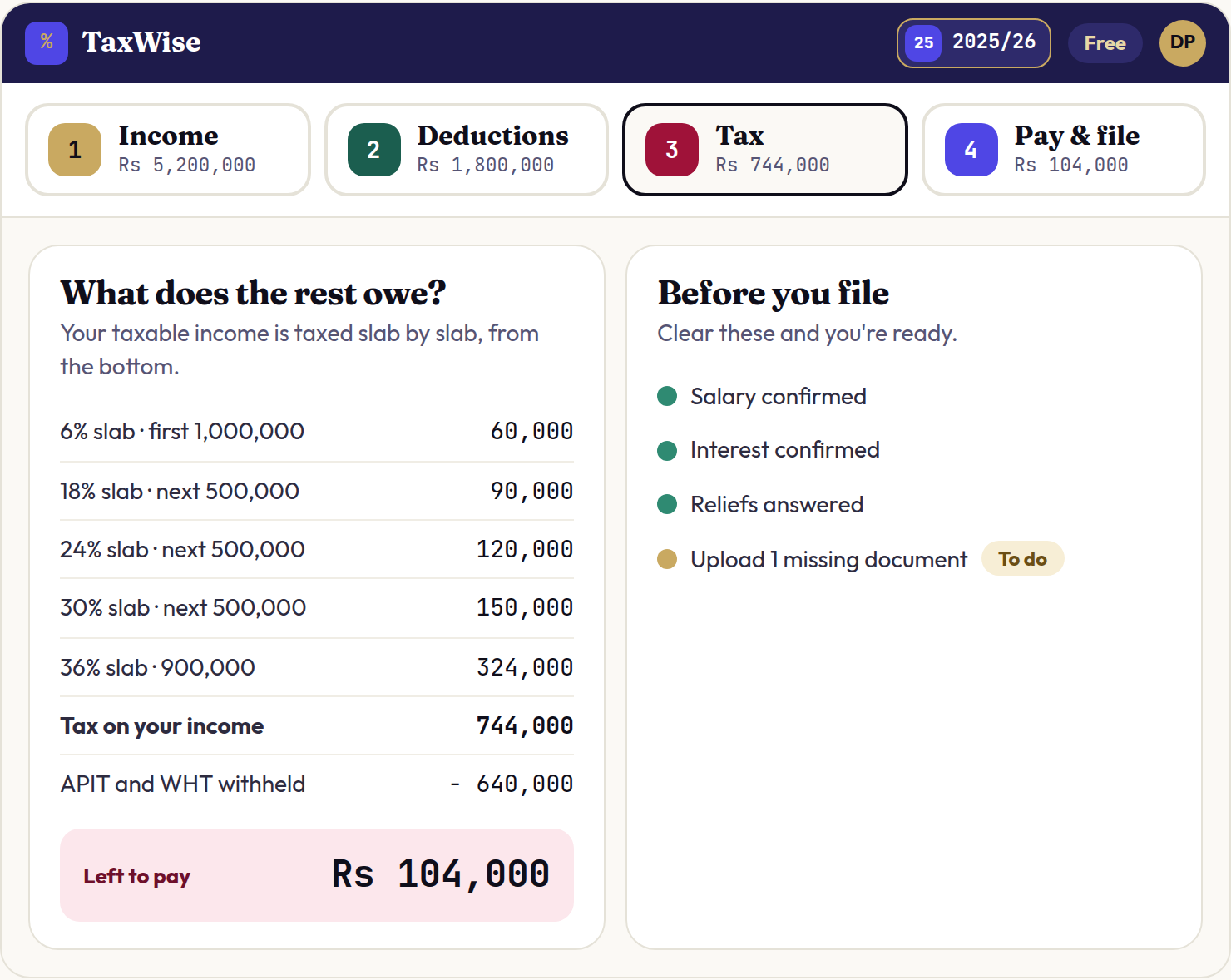
Then look at the Before you file card. Anything marked Blocks filing has to be fixed before the return is complete; items marked To do are worth finishing, such as uploading a certificate you entered from memory.
Read the result with your own year in mind. If you had interest or rent but the tile says "All settled", go back and check that income is there.
Step 6: File on the IRD portal and record it
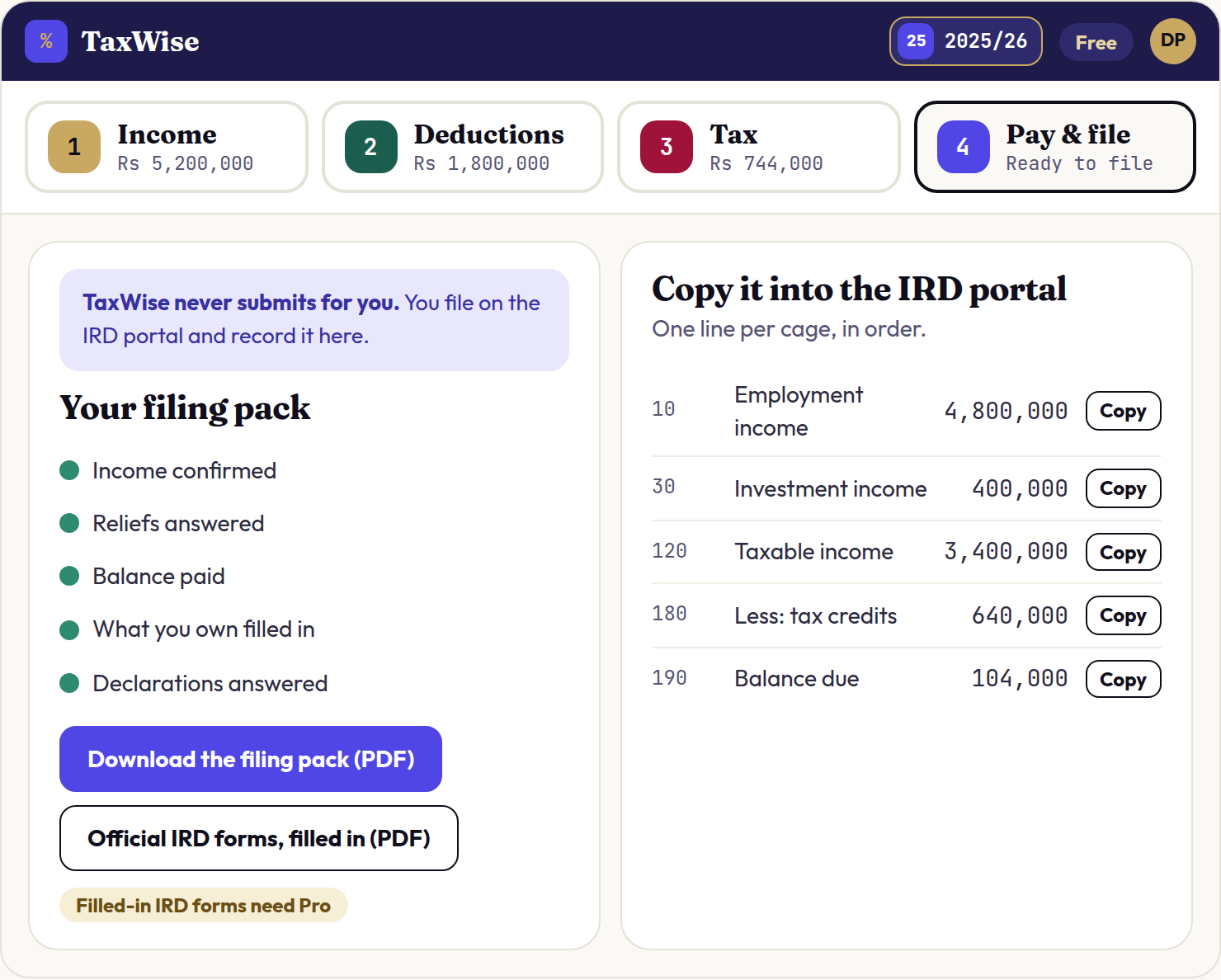
Open Pay & file. Pay any balance first under Balance and Payments, fill in What you own for your statement of assets and liabilities, then go to the File tab.
- Sign in to the IRD e-Filing portal with your TIN.
- Work down Copy it into the IRD portal, entering each figure in the cage TaxWise shows you.
- Submit and save the acknowledgement.
- Back in TaxWise, enter the IRD acknowledgement reference, tick the declaration and press Mark 2025-26 as filed.
On any plan you can copy each line with the guide and record your acknowledgement. Our guide to filing your return on the IRD portal covers the portal side in more detail.
Same person, three returns
Scenario: Dilini earns a salary of LKR 400,000 a month (LKR 4,800,000 for the year). Her employer deducted LKR 600,000 of APIT. She also earned LKR 400,000 of interest on a fixed deposit, and her bank kept LKR 40,000 as AIT.
With everything entered, her assessable income is LKR 5,200,000. Take off the LKR 1,800,000 personal relief and LKR 3,400,000 is taxable.
| Slice | Amount (LKR) | Rate | Tax (LKR) |
|---|---|---|---|
| First | 1,000,000 | 6% | 60,000 |
| Next | 500,000 | 18% | 90,000 |
| Next | 500,000 | 24% | 120,000 |
| Next | 500,000 | 30% | 150,000 |
| Balance | 900,000 | 36% | 324,000 |
| Total | 3,400,000 | 744,000 |
Her credits are LKR 600,000 of APIT plus LKR 40,000 of AIT, which is LKR 640,000. She has LKR 104,000 left to pay. Now see what happens when the same person makes one of two common slips.
| What Dilini entered | Tax (LKR) | Credits (LKR) | Return shows |
|---|---|---|---|
| A. Everything, correctly | 744,000 | 640,000 | 104,000 to pay |
| B. Left out the interest and its AIT | 600,000 | 600,000 | 0, all settled |
| C. Entered the interest, forgot the AIT | 744,000 | 600,000 | 144,000 to pay |
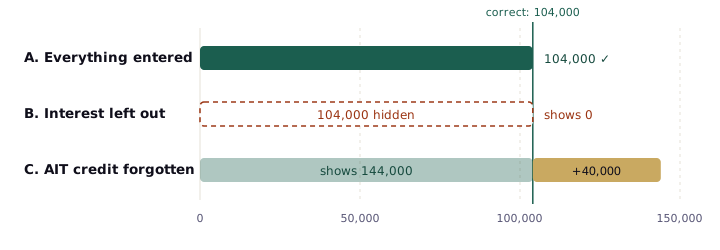
Return B looks the best and is the worst. Figures computed with the TaxWise tax engine for Y/A 2025/2026.
Return B is the dangerous one. The interest sits entirely in Dilini's 36% slab, so leaving it out removes LKR 144,000 of tax, of which only LKR 40,000 was already paid. The return looks settled, but the bank has reported both the interest and the AIT to the IRD.
Return C costs her money instead. The LKR 40,000 her bank already paid on her behalf goes unclaimed, and the only way to get it back is to correct the return.
Notice something else: Dilini's APIT of LKR 600,000 is exactly the tax on her salary alone. That's how APIT is designed, so for many employees the side income is what creates a balance. That's where to take most care. Our guides to bank interest, dividends and APIT go deeper on each.
Common mistakes
- Entering interest net of AIT. Enter the interest before tax and the AIT separately. Entering the net amount understates your income and loses the credit.
- Skipping a small account. Every bank that paid interest issues a certificate. A forgotten savings account is still income.
- Leaving a draft unconfirmed. Drafts don't count until you confirm them.
- Using last year's T-10. TaxWise rejects dates outside 1 April 2025 to 31 March 2026, but check the year printed on each certificate too.
- Claiming expenses that aren't reliefs. Medical bills, school fees and insurance don't reduce your tax under the current Act.
- Stopping at the calculation. Your return isn't filed until you submit it on the IRD portal and get an acknowledgement.
Dates that matter now
| What | Date | Where things stand |
|---|---|---|
| Year of assessment | 1 Apr 2025 – 31 Mar 2026 | Closed |
| Final balance payment | 30 Sep 2026 | Passed. Pay now to limit late-payment charges. |
| Return due | 30 Nov 2026 | Open. E-filing is mandatory. |
Filing after 30 November 2026 carries a penalty of LKR 50,000 plus LKR 10,000 for each further month or part of a month.
Do you need to file at all? If your only income was a salary with the correct APIT deducted, filing is generally optional. File if you had interest, dividends, rent or freelance income, worked two jobs during the year, or want a refund of tax withheld.
Sources
- Inland Revenue Department, Guide to the Return of Income Tax, Y/A 2025/2026 (PDF)
- Inland Revenue Department, Tax Chart 2025/2026
- Inland Revenue Department, Circular SEC/2025/E/02, AIT on interest from 1 April 2025 (PDF)
- KPMG Sri Lanka, Tax Alert: Inland Revenue (Amendment) Act, March 2025 (PDF)
- Inland Revenue Act No. 24 of 2017, as amended, published by the Inland Revenue Department
This guide reflects the rules for Y/A 2025/2026 as of 10 October 2026. It isn't legal or tax advice for your situation.